Top 5 apps to root mobile without PC.
Top 5 apps to root Android mobile without PC.
• Hi guys, today I'm showing how to root Android mobile without PC.
• Here I'm showing about top 5 apps to root your mobile.
1. Kingo root - Download
2. King root - Download
3. iroot - Download
4. Towel root - Download
5. Frama root - Download
After entered the framaroot link, scroll down to download the app.
• After entered the link, skip the ad.
• To root your mobile first go to settings>developer options>USB debugging.
Enable USB debugging in your mobile.
• If you don't have developer options then go to settings>About phone>build number.
• Tap 7 times on build number and go back to settings, then you can see developer options.
Note :-
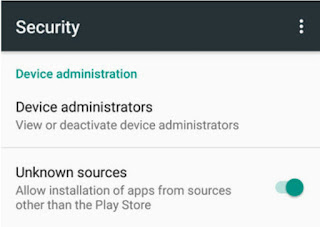
1. When you are installing the app, if installation is blocked, allow the installation of apps from 'Unknown sources'.

• Open the app and click on root. Your device get rooted.
@Follow us.
Note :- For Education Purpose Only.
* If you having any doubts, comment below.

• Hi guys, today I'm showing how to root Android mobile without PC.
• Here I'm showing about top 5 apps to root your mobile.
1. Kingo root - Download
2. King root - Download
3. iroot - Download
4. Towel root - Download
5. Frama root - Download
After entered the framaroot link, scroll down to download the app.
• After entered the link, skip the ad.
• To root your mobile first go to settings>developer options>USB debugging.
Enable USB debugging in your mobile.
• If you don't have developer options then go to settings>About phone>build number.
• Tap 7 times on build number and go back to settings, then you can see developer options.
Note :-
1. When you are installing the app, if installation is blocked, allow the installation of apps from 'Unknown sources'.


• Open the app and click on root. Your device get rooted.
@Follow us.
Note :- For Education Purpose Only.
* If you having any doubts, comment below.


Comments
Post a Comment